Ai Strategy
Microsoft Is Now the Platform for Legal AI

Key takeaways
- Legal teams have proven where AI fits in their work and are ready for the next step: a structured, enterprise-ready AI platform, connected to their core legal systems and governed by the organization rather than by each vendor.
- Microsoft Copilot now provides that platform. Copilot for Legal in Word and Cowork's multi-file analysis cover attorney work product, and plugins, playbooks, and MCP connectors let each team tune it to its own procedures, precedents, and protocols.
- On Microsoft Copilot, legal AI stays under the legal team's control: documents stay in the tenant, existing governance and the enterprise agreement apply, the organization chooses its models, and the team's playbooks and precedents, its intellectual capital, stay its own.
- Legal AI on Microsoft is built in layers: enterprise governance, Microsoft 365 and Power Platform, a legal platform of systems of record and a decision support ontology, and legal skills on top.
- The Spaarke Legal AI Accelerator lets a team start quickly with best practice configured, combining core skills, practice packs, calculation tools for the work that must be exact, and forward-deployed legal engineers, for one practice in one week.
- Everything the accelerator builds carries forward onto the Legal Operations Intelligence platform, where it gains the matter, the policy, and the decision record.
Every legal team is now deciding where its legal AI will live. Early efforts focused on proofs of concept, often using Claude, ChatGPT, and the standard features and settings of Microsoft Copilot. Attorneys have also adopted Harvey, Legora, and other specialized tools for legal work product. At the same time, the vendors of matter management, e-billing, and document management systems have added AI features for the work their own systems hold. These projects have given legal teams a practical understanding of where AI fits in their work, but not a platform the whole legal organization can build on.
Two limits explain why. First, these tools sit outside the core legal systems, or inside only one of them. The work product vendors are adding connectors to matter management and document management, but each connector serves one tool, and the matter, document, and spend information it reaches is processed in that vendor's environment. The AI features in systems of record see only the data their own system holds, one dimension of the work. Second, these tools are governed by their vendors, not by the organization. Each brings its own access controls, audit, and retention, which IT must review and maintain separately from the controls it already runs, and each enforces its own permissions model rather than the organization's. In legal work, where privilege, confidentiality, and client obligations attach to every document, that is what keeps AI from being used broadly across legal stakeholders. As a result, most of this work has stayed with individual lawyers and pilot groups and has not reached the whole legal organization.
Microsoft has built a platform that addresses both. Microsoft 365 is now an enterprise AI platform, uniquely positioned because of the depth and breadth of its capabilities across the business. Copilot is surfaced across the Microsoft 365 applications where legal work is done, including Word, Outlook, Teams, and SharePoint. It is tightly integrated with the organization's files, email, meetings, and chats, under the identity, security, and retention controls the organization already maintains. Importantly, Microsoft provides the flexibility to use the models of choice, including Anthropic's Claude, OpenAI's GPT models, and models of Microsoft's own, so the organization's AI strategy does not depend on a single provider.
In October, Microsoft extended the platform into legal work. On October 15 it made more than 20 legal skills generally available as Copilot for Legal. In Word, a lawyer can review a contract against a playbook, and the Legal for Cowork plugin carries skills for understanding, summarizing, drafting, redlining, and reviewing legal documents. These skills are general by design, and they arrive with what a legal team needs to build on them: a plugin format for its own skills, agents, and tools, connectors to the systems around Microsoft 365, and a registry through which the organization governs all of it in Cowork and Copilot. The broad AI platform and the foundation for attorney work product now sit in one governed environment, the one most legal teams already run. Microsoft is now the platform for legal AI.
What Microsoft provides are the core legal skills and tools, with the flexibility to tune the platform to the legal team's and each practitioner's own standard procedures, precedents, and protocols. Importantly, it also supports MCP connectors and custom-coded tools, so a team can connect the systems it relies on and add calculations for the work that must be exact. This flexibility allows legal teams to shape their legal AI around their own practice, to a degree that applications built around a vendor's own workflows do not offer. Tuning the platform takes legal expertise as much as technical skill. A practitioner who knows the practice can tell which positions the team holds firm and which it will trade, which exceptions it grants and why, and how an experienced lawyer would review the same document. Written into the skills, playbooks, and evaluations, that judgment makes Copilot work the way the team works.
The Spaarke Legal AI Accelerator for Microsoft Copilot lets a legal team start quickly, with best practice already configured. It brings the core legal skills, tools, and connectors set up for legal work, and the forward-deployed legal engineers we described in our earlier article, The Spaarke Method, who tune them to the team's own procedures, precedents, and protocols. Practice-specific modules provide specialized plugins and playbooks across practice areas such as NDAs, commercial real estate, M&A, employment, litigation, patents, and trademarks. This article sets out the case for building legal AI on Microsoft, how it is built, what the accelerator contains and how a team starts with it, and how everything it builds carries forward onto the Legal Operations Intelligence platform.
Microsoft gives legal teams control of their legal AI
Microsoft 365 Copilot is extended through plugins and playbooks. A plugin packages skills, tools, resources, and MCP connectors to other systems. One package works across all of a team's Microsoft apps. A user can upload a plugin and share it with named colleagues, Cowork converts plugins built for Claude automatically, and administrators govern plugins for the whole organization through a registry. Playbooks are simpler still. A lawyer drafts a procedure document in Word, setting out how the team reviews an agreement or handles a request, and Copilot turns it into a skill that works to the standards of that lawyer and that team. Playbooks give each user a way to personalize Copilot to work the way they work.
Copilot for Legal in Word either replaces or augments third-party drafting add-ins such as Claude, ChatGPT, Harvey, or Legora. It reviews, drafts, and redlines in the document the lawyer is already working in, tailored by the team's own playbooks, and it draws on the lawyer's mail, meetings, and files across Microsoft 365 under the same sign-in and permissions as everything else. Collaboration on the document stays in Microsoft as well. SharePoint sites and Teams channels with restricted access and sensitivity labels serve as the confidential work rooms that Harvey offers as Vault and Legora as Portal. Outside counsel and clients join them as guests under the organization's own controls.
Cowork is the multi-file, multi-source analysis tool, comparable to Harvey's Vault review tables and Legora's Tabular Review. It takes on multi-step work across a user's files and applications. A lawyer can ask it to review a set of agreements, extract the key terms into a table, compare them against the team's playbook, and draft the issues list. It draws on documents in SharePoint, mail in Outlook, and the systems its connectors reach. Cowork can also provide detailed analysis across many invoices at once, checking each line against the outside counsel guidelines, with calculation tools handling the arithmetic. The work runs in the organization's tenant, on the model the organization chooses.
Six properties make Microsoft the platform on which a legal team should build its AI.
- The team's documents stay where they are. Copilot processes prompts and responses within the Microsoft 365 service boundary, keeps each organization's content isolated within its tenant, and surfaces only what a user already has permission to see. Nothing has to be copied into a vendor's environment for the AI to work on it.
- The organization's governance already applies. Microsoft Entra ID controls who can reach what, Copilot honors the usage rights that sensitivity labels apply, and the organization sets retention for Copilot in Microsoft Purview. IT can approve legal AI with the policies it already maintains, without a new security review or new data processing terms.
- The organization chooses the model. Claude, GPT, and Microsoft's own models run in the same environment, and the organization changes its choice as the models improve.
- The AI sees the context around the work. Through Work IQ, a skill reads the mail, meetings, files, and chats around a matter that a lawyer would otherwise paste in by hand.
- It works within the organization's existing Microsoft agreement. Legal AI on Microsoft runs on the organization's enterprise agreement and the Copilot licences it already holds, and the organization provisions and manages capacity through Cowork's usage-based billing. Lawyers do not run into the usage limits of individual subscriptions in the middle of their work, and legal does not need a separate contract and security review for each new tool.
- What the team builds stays its own. Skills are written in the open Agent Skills standard, and playbooks and knowledge live in the team's own SharePoint. A legal team's playbooks, positions, and precedents are its intellectual capital, and on Microsoft that capital stays in its own environment, in a form it can carry to whichever model or tool it chooses next.
In contrast, Claude, ChatGPT, Harvey, Legora, and the AI in systems of record all work from outside the legal team's tenant, and the limits described at the start of this article follow from that. Each lacks the team's full context, because it reaches the matter, the mail, and the documents only through the connections built for it. Each lacks the organization's own governance, because it runs under the vendor's controls. And each holds the skills and positions a team encodes in it inside the vendor's product, where the team cannot carry them to the next tool. Individual subscriptions add a further limit, leaving each lawyer's prompts and skills on that lawyer's account, out of reach of the team. In our earlier article, Why We Built on Microsoft, we explained why we made the same choice for the Spaarke platform.
Legal AI on Microsoft is built in layers, from enterprise governance to legal skills
Legal AI that a legal team can rely on is built in layers, and each layer inherits what the layers below it provide (Exhibit 1). Microsoft supplies the governance and the services at the base, a legal platform of systems of record and a decision support ontology sits in the middle, and legal skills, tools, and agents run on top. Copilot and Cowork reach across all of them.
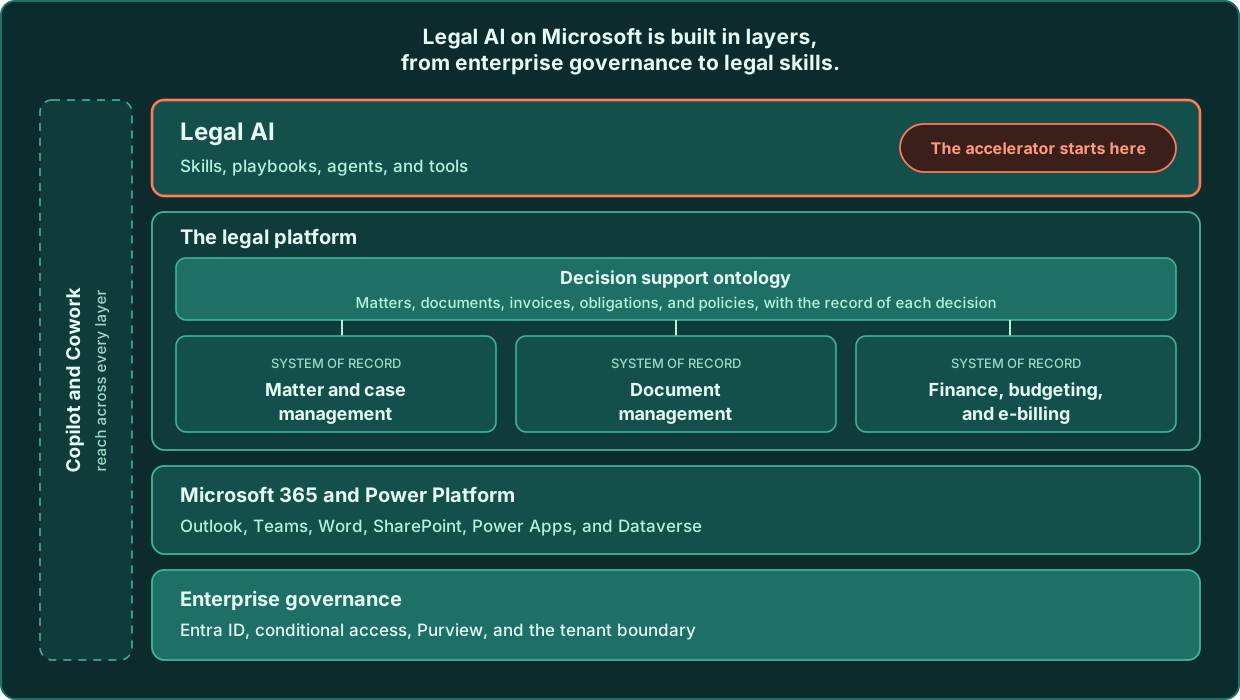
Enterprise governance. Microsoft Entra ID controls who can sign in and what each person may reach, conditional access sets the conditions under which they may reach it, and Microsoft Purview applies sensitivity labels and retention. The tenant boundary contains all of it. Every layer above inherits these controls.
Microsoft 365 and Power Platform. Outlook, Teams, Word, and the other Office applications are where legal work is drafted, negotiated, and discussed, and SharePoint is where much of it is stored. Power Apps and Dataverse are the services on which business applications are built inside the same tenant, under the same identities and the same governance.
The legal platform: systems of record. Legal operations depends on three systems of record above all. Matter and case management holds each matter's parties, budget, deadlines, and assigned counsel. Document management holds the work product with its versions and permissions. Finance holds budgets, invoices and e-billing, and outside counsel spend. Spaarke provides system of record capabilities for each of these on Microsoft, and works with the systems an organization already runs where they serve it well.
The legal platform: the decision support ontology. The ontology is the model of what legal operations works on, such as matters, documents, invoices, obligations, and policies, and of the relationships among them. It is bound to the systems of record where the data sits, and it holds a record of the decisions taken on that data, by whom, and on what evidence. In our earlier article, The Legal Operations Intelligence Ontology, we described how each system of record holds one dimension of the work and how the ontology connects them. This layer answers the first limit of early legal AI: a skill on Microsoft reaches the matter, the documents, and the spend through one model of the work, instead of through a separate connection for each tool.
Legal AI. Skills, playbooks, agents, and tools run in Copilot and Cowork and draw on every layer below. A skill that reviews an agreement reads the team's playbook from SharePoint, checks the matter it belongs to, and works within the permissions Entra ID grants the lawyer who runs it.
Assembling this stack for legal work is what turns Microsoft's platform into one the whole legal organization can build on. The accelerator starts at the top layer, on the governance and services Microsoft already provides, and the platform layers follow.
The Spaarke Legal AI Accelerator puts the platform to work in days
The Spaarke Legal AI Accelerator for Microsoft Copilot is a rapid deployment of legal AI on Microsoft's platform. It combines pre-built legal skills, tools, and connectors with forward-deployed legal engineers, who bring the legal and technical expertise to configure them for a legal team's own practices, so that a team can start an AI program, or extend one already under way, in days.
Three layers of legal content
The legal content in the accelerator comes in three layers. Spaarke maintains the first two, and the legal team owns the third.
The foundation. The foundation is the set of core legal skills that every practice uses: reviewing a document against a playbook, building a playbook from the team's positions, preparing an issues list, extracting key terms into a table, comparing documents, building a chronology, writing a matter brief, and checking citations and sources. It also carries the governance that applies to every skill, including human review guidance, and an evaluation set.
Practice packs. Practice packs carry the specialty skills for a practice, tuned by Spaarke practitioners, for practice areas such as NDAs, commercial real estate, M&A, employment, litigation, patents, and trademarks, together with an invoice review pack for legal operations. A pack contains the practice's skills, playbook templates, checklists, knowledge library structure, and the calculation tools the practice needs. Consider, for example, a real estate team that abstracts leases. Its pack holds the lease review and abstraction skills, a lease playbook template, and the tools that calculate rent escalations and notice dates.
The team's own playbooks. The third layer is the legal team's own positions: its preferred and fallback positions, its escalation rules and contacts, its house style, and its approved precedents. A guided setup interview captures them into files the team owns, and Spaarke's updates to the foundation and the packs never overwrite them. This layer is where the team's own expertise enters its legal AI, and most of the effort in a deployment goes into writing it down.
What's included
The accelerator delivers the following components into the organization's own tenant.
- Legal skills. The foundation and practice pack skills, packaged in the Agent Skills format and deployed as plugins to Cowork and Copilot Chat.
- Playbooks for Word. Playbooks rendered as Word documents from the team's own positions, for use with Word's legal drafting and review skills.
- Knowledge library. A SharePoint site structure for the team's precedents, clause library, and checklists, in the organization's own tenant.
- Agents. Copilot agents for each practice, grounded on the knowledge library and shared with the team.
- Tools and MCP connectors. Calculation tools for the work that must be exact, connected to Copilot through MCP, and the configuration of connectors to systems the organization already licenses, such as its document management system.
- Setup interview. A guided skill that walks a practice lead through the team's positions, fallbacks, escalation, and house style and writes them to the team's own files.
- Evaluation set. Questions and documents for each practice, extended with the team's own, so that results are tested on the team's work against how the team does it today.
- Governance and deployment. Human review guidance in every skill, a summary for IT of what is installed and how data flows, an administrator deployment package, and an install that Purview can audit.
- Adoption. Installation guides, training prompts, and a usage baseline from which the team can measure results.
Tools do the work that must be exact
The accelerator includes tools as well as skills because some legal work cannot vary. AI's probabilistic outputs can be variable, inconsistent, and inaccurate, and the same question can return a different answer on a different run. Much legal work, such as reading a clause or drafting a fallback, suits a model well. A notice deadline in a lease, a rent escalation, a patent term, or the arithmetic on an invoice has to return the same answer every time. The accelerator computes those with tools that calculate the same way on every run, and the AI calls the tool when the work needs one. In our earlier article, Legal AI Is Not Deterministic, we explained why that matters for legal work that requires precision.
Legal teams can deploy the accelerator themselves or with forward-deployed legal engineers
A legal team can start with the accelerator in two ways. A lawyer can add a practice pack in Cowork and share it with colleagues, and a practice team can add the knowledge library and the practice agent on a SharePoint site it already owns. Teams that take this route are working with the pack within hours, and they write their own playbooks with the setup interview. Organizations that run Information Barriers, as many law firms do, start with the IT-deployed route.
Teams can also work with Spaarke's forward-deployed legal engineers. A legal engineer is an attorney, a legal operations professional, or a specialty practitioner who understands how legal work is done, knows where AI adds value and where a calculation or a workflow will do better, and works inside the team's own operations. The engagement runs the Spaarke Method once, for one practice, in a week. The team chooses its first two or three tasks and records how long they take today. The legal engineers and the practice lead write the team's playbooks, curate its knowledge library, and configure and connect the skills and tools. The team then tests the results on its own documents against the baseline, and the legal engineers train the team and hand over the deployment. Organizations that install software centrally take this route with their IT team, and the legal engineers prepare the administrator deployment package.
Either route can start an AI program or extend one. Most legal teams already have AI work under way, in prompts a lawyer has refined in Claude or ChatGPT, in documents a team has collected, or in a pilot that proved a tool, and the accelerator builds on that work rather than replacing it.
We recommend the engagement for a team's first practice. A self-deployed pack is useful on the first day, but the gain comes from the team's own playbooks and from evaluation on its own documents, and both go faster with a legal engineer in the room. Once the first practice is running, the team can add the next pack itself.
Everything the accelerator builds carries forward onto the Legal Operations Intelligence platform
The accelerator is the first step on the path to legal operations intelligence, because what it builds belongs to the legal team and connects to the systems of record and the decision support ontology as those layers are put in place. In our earlier article, From Reactive to Predictive, we set out five levels of intelligence depth and observed that more tools at Level 2 keep a department at Level 2. The accelerator builds the team's positions, knowledge, and evaluations on the platform the organization already runs, in a form the team owns, and the legal platform layers in Exhibit 1 are where Levels 3 to 5 are built (Exhibit 2).
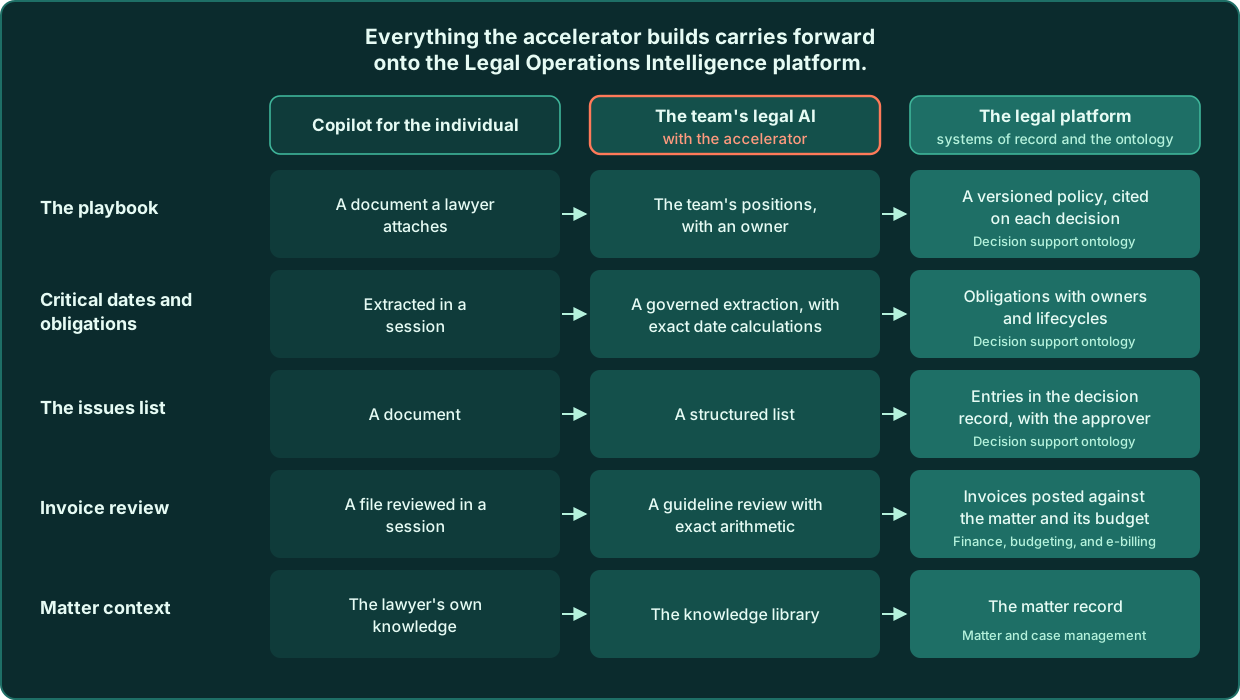
Each part of what the accelerator builds has a place on the platform.
Matter and case management. A skill that today asks the lawyer which matter a document belongs to reads the matter record instead, with its parties, budget, deadlines, and assigned counsel, so the skill's work starts from what the department already knows about the matter.
Document management. The knowledge library and the documents a skill reviews sit in the document system of record, with its versions, permissions, and retention, and the matter they belong to.
Finance, budgeting, and e-billing. Invoice review moves from a file reviewed in a session to invoices posted against the matter and its budget, with the guideline review and the arithmetic recorded on each invoice and spend visible across firms.
The decision support ontology. The team's playbooks become versioned policies that are cited on each decision. Critical dates and obligations extracted from agreements become obligations with owners and lifecycles. Issues lists and approvals become entries in a decision record that shows who decided, on what evidence, and under which version of the policy.
The team keeps everything it learned to use. The skills it runs in Cowork and the playbooks it attaches in Word work the same way, and the platform adds the matter, the policy, the authority, and the record that let the legal team's decisions build on one another.
The Spaarke Accelerator: one practice, in one week
Microsoft 365 now runs the models legal teams have come to rely on, inside the organization's own tenant, with legal skills of its own and a plugin format that carries the skills teams have already built. That makes Microsoft the platform for legal AI, including for teams that rely on Claude or GPT today, because both models run inside it. The documents stay in place, the governance already applies, the organization chooses the model, and the team's intellectual capital stays its own. The Spaarke Legal AI Accelerator supplies the legal content, the tools, and the legal engineers to put that platform to work, and everything it builds carries forward onto the Legal Operations Intelligence platform.
The timing matters. Copilot for Legal and Cowork are now generally available, and IT teams are setting the plugin and connector policies that will govern legal AI in their organizations. Legal teams that encode their positions on the platform now will help shape those policies and will have the most to build on.
The accelerator engagement covers one practice in one week. At the end of it, the team has its own playbooks, written with the setup interview and held in its own files; the practice pack and agent deployed in its own tenant; results measured on its own documents against today's baseline; a deployment package its IT team has reviewed; and a plan for the next practice.
To prepare, legal operations leaders can take a few practical steps. Choose one practice and two or three recurring tasks where the team wants results first. Write down the team's positions for those tasks, with fallbacks and escalation. Gather the AI work already under way in the team, including the prompts and skills lawyers have built in Claude or ChatGPT, so the first deployment builds on it. And confirm the Microsoft setup with IT: Copilot licences, the Cowork usage policy, and who approves connectors.
To start, book a scoping session. In 30 minutes we will choose the practice and the first tasks, confirm the Microsoft setup with your IT lead, and plan the week. Teams that prefer to begin on their own can add a practice pack in Cowork and run the setup interview.
Sources
- Microsoft, Introducing Microsoft Copilot for legal (October 15, 2026)
- Microsoft Support, Get started with Copilot for legal
- Microsoft Learn, Manage Copilot for legal
- Microsoft Learn, Available plugins for Copilot Cowork
- Microsoft, Introducing the plugin registry (September 30, 2026)
- Microsoft Learn, Build plugins for Copilot Cowork
- Microsoft Learn, Use plugins with Copilot Cowork
- Microsoft, Copilot Cowork is now generally available (June 16, 2026)
- Microsoft Learn, Choose a model for Copilot Cowork
- Microsoft, Microsoft Build 2026: Be yourself at work (June 2, 2026)
- Microsoft Learn, Work IQ overview
- Microsoft Learn, Data, Privacy, and Security for Microsoft Copilot
- Microsoft Learn, Manage Copilot Cowork for your organization
Related reading:
To learn more about the Spaarke Legal AI Accelerator, contact Ralph Schroeder, Founder and CEO of Spaarke, at ralph.schroeder@spaarke.com, or visit spaarke.com.
Continue reading



Want to see how it works?
Get access